
Easy On Hold® for 3CX Phone System
Deploy professional music on hold and custom messages directly into your 3CX phone system.

3CX Music On Hold Setup, Playback Options and Resources
Our experts help you connect with callers using custom music and messages designed for the 3CX phone system.
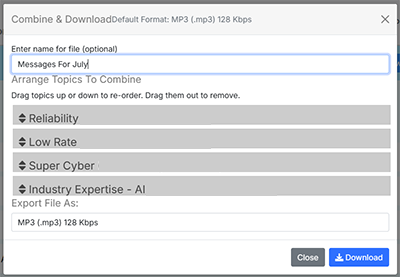
The hold button plays the audio file from the beginning for each caller. Break the monotony. Use the Combine & Download feature in your Easy On Hold® Content Control Center™ to create multiple versions of your messages and rotate them periodically.
Some versions of the 3CX platform allow playlists and randomization. Check the 3CX StartUp Guide.
3CX Hold Music Implementation Options
Hold Music Playlists
3CX documentation states you can load up to ten files (each under 10 MB) and make them into a playlist. As a best practice, select "Randomize." Easy On Hold® organizes your content by topic in your portal. It's a good fit for the 3CX file-based platform.
Randomize Content
When “Randomize per call” is enabled under Settings → Music on Hold → General MOH, 3CX randomly chooses one of your uploaded audio files for each new call that goes on hold. Review the article: 3CX Music On Hold: Making a Better Customer Experience.
Platform Limitations
The maximum file size for hold music messages in 3CX is 20 MB. Using 8 kHz, 16-bit mono PCM WAV audio, you can load up to approximately 20 minutes of audio.
Quality Testing
Easy On Hold® will assign a Customer Success Representative who will periodically call to evaluate the quality of your music-on-hold messages. Please designate a telephone number for testing. This may route to a call agent, receptionist, marketing representative or IT team member.
Get Info & Request a Demo
Tell us a little about your business and we’ll show you how Easy On Hold can elevate your customer experience.